



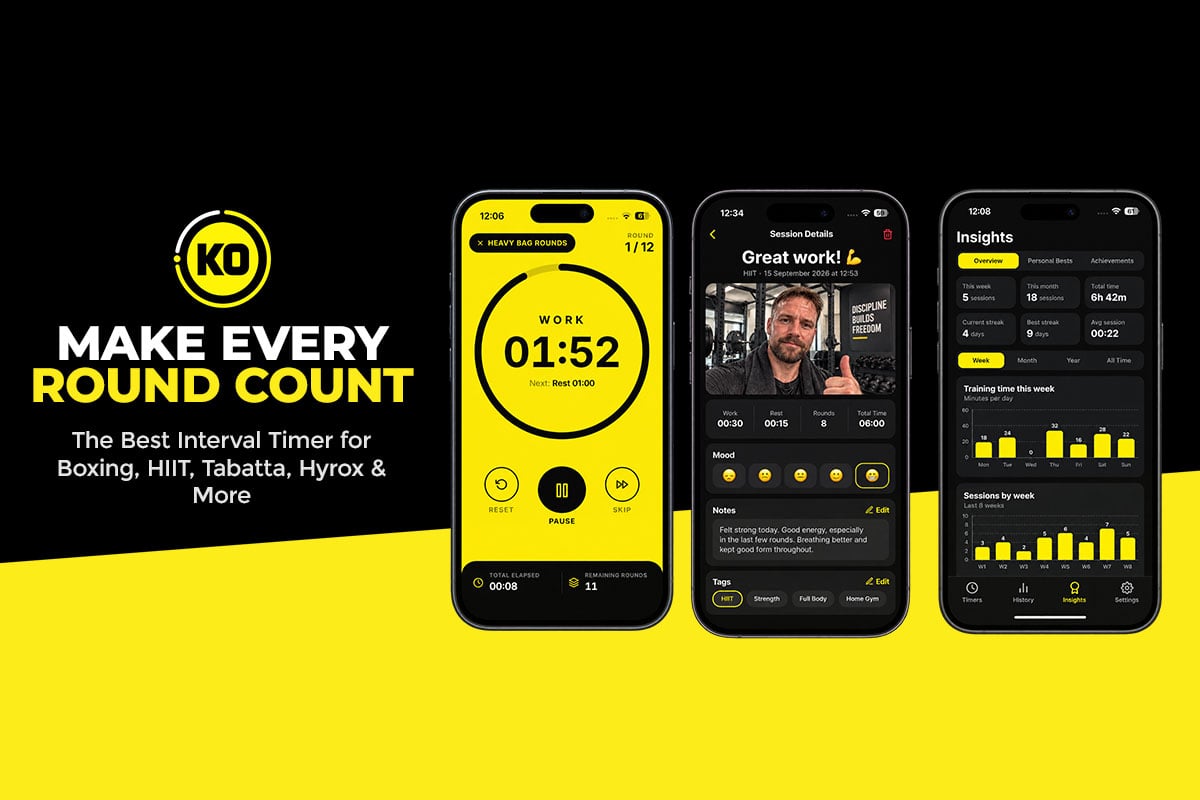


A basic interval timer beeps, counts down and forgets you the moment you’re done. KO Interval Timer takes a far more rewarding approach. This iPhone app combines a flexible round timer with voice coaching, achievement badges and a personal workout journal, turning every session into something you can feel, track and look back on.
If you train in rounds or timed intervals, whether that’s on a heavy bag, in a HIIT class, under a barbell or on a yoga mat, it gives you complete control over your workout. Below, we break down everything it offers and why it earns our recommendation.
Who Is KO Interval Timer For?
The name hints at boxing, and fighters will feel right at home. But the app adapts to almost any style of timed training:
- Boxing and kickboxing: set round lengths, rest and prep time for bag work, shadowboxing, pads and sparring.
- HIIT: alternate all-out bursts with short recovery periods.
- Circuit training: move between stations on timed work and rest phases.
- Tabata: run fast, punchy sessions with short work and rest intervals.
- Strength and conditioning: structure timed sets, rest and conditioning rounds.
- Stretching and mobility: use longer intervals for flexibility and recovery work.
It’s also a smart pick for personal trainers, who can save repeatable sessions for clients and switch training styles in seconds.
Meet Your Coach (and Their Sense of Humor)
The feature that makes KO Interval Timer instantly memorable is its optional voice coaching. Rather than relying on beeps alone, you get a real voice in your ear, which can be exactly what you need when your arms are heavy and you’re tempted to quit. You can pick from three coaches:
- Male Coach: motivating and focused, built to keep you pushing.
- Female Coach: an alternative voice offering guidance and encouragement.
- Boxing Coach: a fiery, fight-gym personality that’s perfect for bag work, shadowboxing and combat training.
The Boxing Coach hides a bonus: Funny Mode. Switch it on and you’ll hear humorous motivational lines between rounds. Imagine gasping for air after a hard three minutes and getting a joke before the call to go again. It’s a refreshing change in a category full of serious, no-frills apps, and it keeps routine workouts from going stale.
If you’d rather train with simple tones and countdowns, the coaching can be turned off at any time.

A Timer Builder That Fits Your Training
Under the personality sits a seriously capable timer. Instead of locking you into fixed presets, KO Interval Timer lets you design workouts around your own needs.
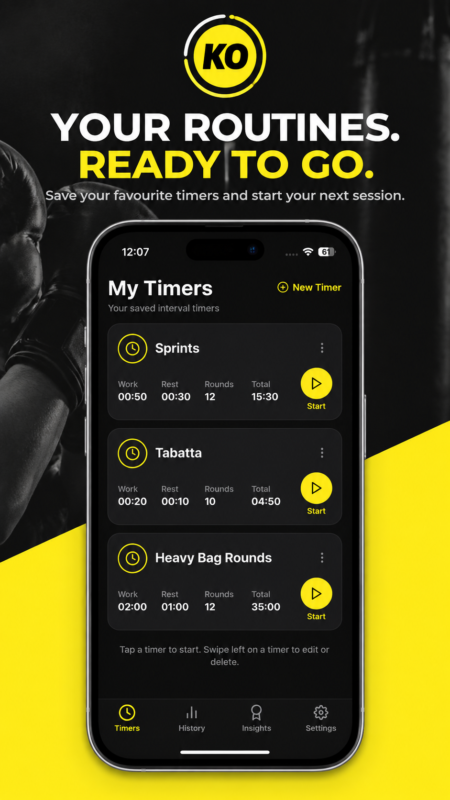
You control the work periods, rest times, number of rounds and preparation countdown, and you can name each phase however you like. Set up five three-minute rounds with one-minute breaks for boxing, or 30 seconds on and 15 seconds off for a HIIT blast. It’s equally at home with a quick living-room session or a long gym workout.
Every timer you create can be saved to your personal library, so favorite routines are ready to go instantly. Want to progress? Duplicate a timer and adjust it to add rounds, cut rest or build a harder version without starting from scratch.
Easy to Follow, Easy to Start
Mid-workout, you shouldn’t have to squint at a screen, and KO Interval Timer makes sure you don’t. You can choose your timer sounds and customize alerts for the start of a session, every switch between phases and the final bell. Spoken countdowns let you keep your eyes on the bag, while optional vibration and visual signals help you stay on track in a noisy gym or a quiet home setup.
The interface is modern and uncluttered, with a large, readable countdown so you can check the time remaining at a glance. Make it your own with a custom accent color, preferred sounds and coaching voice. A keep-screen-awake setting means the timer stays visible without unlocking your phone.
Getting started is quick, too. Home screen widgets put your saved timers and training summaries one tap away, and Siri Shortcuts let you launch a workout by voice, which is ideal when your gloves are already laced up. Visit the official KO Interval Timer page for a closer look.
Badges, Streaks and Stats That Keep You Coming Back
Motivation fades, so KO Interval Timer gives you reasons to return. Achievement badges reward your training milestones, adding a playful, game-like edge. If you love checking off challenges and collecting rewards, each new badge delivers a satisfying little win.
Behind the badges is a complete workout history. The app records your total training time, rounds completed and overall activity, and it tracks training streaks to reward consistency. Review these numbers and you’ll quickly see how often you’re training, whether your round counts are climbing and how your routine has grown.
For anyone trying to build a lasting fitness habit, having that progress laid out in one place is a genuine boost.
The Training Journal: KO’s Secret Weapon
If one feature sets KO Interval Timer apart from the crowd, it’s the built-in workout journal. Where other timers stop at the final bell, this one invites you to capture how the session went.
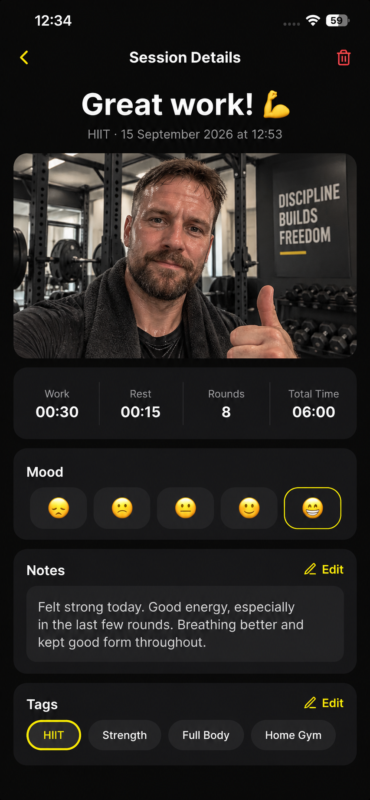
Each entry can hold written notes, tags, a difficulty rating and how you felt before and after training. You can also log your bodyweight to watch trends over time. Look back after a few weeks and the patterns jump out: the routine that once flattened you now feels manageable, or certain workouts consistently leave you energized.
Then there’s the post-workout selfie. Snap a photo after each session and it’s saved alongside your entry. Instead of a list of dates and numbers, you build a visual timeline of real progress, which is a huge motivator if you’re chasing weight loss, muscle gain or better conditioning. It’s also a fun way to remember the days you conquered a brutal workout.
Notes, data and photos together make the journal feel less like a log and more like a personal fitness diary.
Privacy First, Plus Pricing Details
Because your journal can include selfies and bodyweight, privacy matters, and KO Interval Timer handles it well. Your entries, notes and photos stay stored locally on your iPhone rather than on the developer’s servers, and no account is needed to get started.
The trade-off is that there’s no cloud backup or device syncing at the moment. If you switch phones or delete the app, don’t count on your journal coming back with it.
KO Interval Timer is free to download from the App Store and runs on iOS 16.4 or later. A subscription, available monthly or annually with prices shown up front, unlocks the timer and premium features.
The app is built to stay open while you train and doesn’t currently send background or lock-screen alerts. Keep your phone in sight with the screen-awake option enabled and you’ll barely notice.
The Verdict: A Knockout Choice
KO Interval Timer gets the fundamentals right, with customizable rounds, rest periods, countdowns, sounds and a library of saved workouts. What lifts it above ordinary timers is everything layered on top.
Three voice coaches keep your energy up, and the Boxing Coach’s Funny Mode adds personality you won’t find elsewhere. Badges, stats and streaks make consistency rewarding. Best of all, the journal and post-workout selfies record the effort behind each session, building a story of your progress you’ll be proud to look back on.
Keep the subscription and the lack of background alerts in mind, but for boxers, HIIT enthusiasts and anyone who loves tracking their fitness, this is an easy app to recommend. Ready to train? Download KO Interval Timer on the App Store, or explore more on the KO App Studio website.


